

sign in // Cart (0) $0.00 USD
the mc blog

HELLO FRIENDS!

Welcome to The Modern Collective blog! We are Adam + Amanda. We are photographers who love fun and funky design. We design modern templates for photographers and sell them in our shop! Cool, right?

Learn more about us, here.

Reduce Your Editing Time In Camera // Tip Tuesday

May 22, 2013   //   POSTED IN: Photog Quick Tips, PHOTOGRAPHY RESOURCES, Tip Tuesday

We got a little behind so this week's Tip Tuesday happens to fall on a Wednesday! We hope you don't mind! Today we want to discuss portrait lighting and pose refining. Simple changes to your subject's pose can make a huge difference in the final look of your portrait and it can greatly reduce your time spent in post production! Take a look at the image below to see for yourself! 


SIDE NOTE //  The image used in the above tutorial was edited using actions from Michelle Kane Photography. If you want to reduce your editing time without sacrificing the quality of your images, you need to check out Michelle's action collections! Serious time savers, people! And no, this isn't a sponsored sales pitch... we really do LOVE all of Michelle's actions!!


$50 SHOPPING SPREE GIVEAWAY WINNER  //

We posted a little challenge in last week's Tip Tuesday post. We asked how you would use extra wallet prints in your studio. We have a winner! Congrats to Susan Dodd for sharing her tips! You are the winner of the $50 Shopping Spree in The Modern Collective Shop!


Come back next week for another Tip Tuesday! 

Introducing Urban Crossroads // New Product

May 16, 2013   //   POSTED IN: FEATURED PHOTOGRAPHER, PHOTOGRAPHY RESOURCES, PRODUCT SPOTLIGHTS, theMC NEWS

Say hello to Urban Crossroads, the new senior layflat book design from The Modern Collective! Need that perfect product to impress your senior guys? This 20 page book design will do the trick! Included with the design is theMC's exclusive Album Splitter Action. The Album Splitter Action allows you to export your design for any of WHCC's square book designs in less than five minutes! Sizes include 5x5, 8x8, 10x10, and 12x12 books! Easy, simple, done! 


You can see larger images of this design's layouts, HERE.


- - -


 Visit The Shop Buy Now

Free Wallets for Marketing // Tip Tuesday

May 14, 2013   //   POSTED IN: Photog Quick Tips, PHOTOGRAPHY RESOURCES, Tip Tuesday


We are back with another Tip Tuesday! Today the topic is WALLETS! Wallets are a fun product to offer. Moms love them, seniors trade them, dads put them in their wallets, etc. Wallets aren't just for your clients; they can be a great tool in your studio too! Selling wallets in sets of seven leaves one extra wallet for you to use! The best part, it doesn't cost you a dime!! Below are a few things you can do with your extra wallets!


IDEAS FOR YOUR EXTRA WALLETS //

- place them in your studio's waiting area for clients to look at during consultations or before their session

- use them as a style guide for your clients. Love what a past client wore? Share it with other clients! 

- bind them with a binder ring and throw them in your camera bag for a quick pose guide for times you lack inspiration at a session.

- make a wall of wallets in your studio. Your clients will love seeing their face on your wall! 

- use them in your marketing pieces! Client's love seeing other client's photos!


WIN $50 FOR theMC SHOP!

We want to hear how YOU would use your extra wallets? Share this post with the share links below (facebook | pin | tweet) and then leave a comment telling us how you would use extra wallets in your studio. Once person who shares their ideas in the comments below will be chosen for at $50 shop credit to The Modern Collective Shop! We will announce the winner in next Tuesday's Tip Tuesday post! 


Ready, set, GO! 

How To Link Your Facebook Pages for More Marketing Potential // Tip Tuesday

May 07, 2013   //   POSTED IN: Photog Quick Tips, PHOTOGRAPHY RESOURCES, Tip Tuesday


We all know that Facebook has a ton of marketing potential if used correctly. Today's Tip Tuesday will show you how to lead potential clients from your personal facebook page to your studio's business page on Facebook! It will increase your marketing potential and increase the traffic to your business page! Watch the short video below to find out how!


Check back next week for another Tip Tuesday! Want to read our past tips for photographers? Click HERE.

How To Create Banners With The Pen Tool // Tip Tuesday

April 30, 2013   //   POSTED IN: FREEBIES, PHOTOGRAPHY RESOURCES, Tip Tuesday

Today we have a HUGE Tip Tuesday for you! We have a video tutorial and FREEBIES! Yay, we know everyone loves freebies! 


Today's Tip Tuesday video will show you how to use the pen tool in Photoshop to create banner and tag shapes! Watch the video and then click the link below to access the banner downloads! 


FREEBIES! Click the link below to download these six banner freebies shapes! The freebie is a layered PSD file. All colors and text can be changed!


ACCESS THE FREEBIES HERE // http://bit.ly/Banner_Freebies


Check back next week for another Tip Tuesday and feel free to share this post with your friends with the share links below!

Grad Announcement for Senior Guys // Product Spotlight

April 26, 2013   //   POSTED IN: INSPIRATION, PRODUCT SPOTLIGHTS

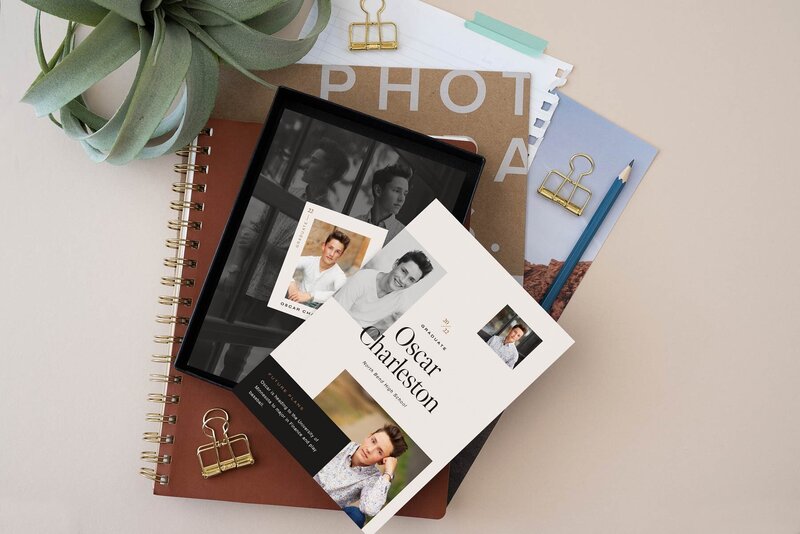
Last week we featured two of our favorite grad card designs for the senior girls. We thought it wasn't fair to leave the guys out, so today we are featuring Liam + Sean, two of the senior grad card templates from the 2013 Grad Card Collection


These two designs are modern, masculine, and filled with plenty of style for those senior guys that want something different! Plus, these designs will make their mom happy too! We all know that is who we really are trying to impress!


Like all templates in The Modern Collective Shop, designing with these grad card templates is as easy as dragging and dropping your images and changing the text to match your client's party details! Quick, easy, and DONE!  

Featured Templates:  Liam 5x7 Flat Grad Card Design  //  Sean 5x7 Flat Grad Card Design

Quickly Convert Layered PSD files to JPEG in Photoshop // Tip Tuesday

April 23, 2013   //   POSTED IN: Photog Quick Tips, PHOTOGRAPHY RESOURCES, Tip Tuesday

We were shocked the other day to hear that some photographers have never heard of the great and almighty Image Processor tool within Photoshop! We had a photographer tell us that they were opening each individual PSD and converting their files to JPEGs MANUALLY! What?! No way!


If this is you, this Tip Tuesday is going to blow your mind! Follow the steps below to automate the PSD to JPEG process. 


STEP 1: 

Start by making sure all of your layered PSD files are in a single folder. You will be selecting this folder in a later step, so make note of its location on your computer. 


STEP 2:

Open Photoshop and navigate to File > Scripts > Image Processor


STEP 3:

Once open, the image processor will look like the image below. There are a few options that need to be filled in before you can put it to work. We've listed them below.

SELECT SOURCE FOLDER // this is the folder which contains your PSD files.


SELECT DESTINATION FOLDER // this is the folder where you want your final JPEGs to save. Keep in mind, Photoshop will create a folder in this location titled JPEG and will save all the flattened files in this folder.


SELECT FILE TYPE // Make sure you check the "Save as JPEG" box and choose your desired quality. We usually do 10. We also like to check the "Convert Profile to sRGB" box so these files will display with the richest colors when uploaded to the web. 


OPTIONAL // There are a few additional options within the Image Processor Menu. The Resize to Fit option can be used to resize your files for web. Just enter the desired max width and height in the boxed provided. You can also choose to run an action before the files are saved. This is great for web sharpening or to use an action that watermarks your images. 


STEP 4: Click Run! Sit back and watch your computer do all the work for you! Photoshop will open each PSD from the source folder and save the flattened JPEG file in the destination folder. We guarentee it will do it faster than you can do it manually! 


STEP 5: Check your work. All of your PSDs should have been saved as JPEGs in the destination folder. If they aren't there, go back and double check your settings. 


- - - 


Check back next week for another Tip Tuesday! Want to read our past tips for photographers? Click HERE.

Design Trend // Gold Foil - Is it here to stay?

April 17, 2013   //   POSTED IN: INSPIRATION, PRODUCT SPOTLIGHTS

We've been seeing gold foil ALL OVER lately! It seems to be all the rage on design blogs. We've even spotted it on clothing and housewares in our most recent trip to Target. (oh Target.... how we love you!) Gold foil is luxurious, it's sexy, it's modern, and it's a little funky too! No wonder it's so popular! Below are a few of our favorite gold foil finds on the internet!

SOURCES:  | 1 | Drop It Modern  | 2 | Anagrama  | 3 | Ben Sherman   | 4 | Lara Casey Shop


We've been inspired and thought we better join the fun and use the new gold foil love on a few of our products here at The Modern Collective! Of course, in our Modern Collective fashion, we simplified the trend and incorporated the gold foil in two of our 2013 Grad Card designs! The Zoey and Taylor grad announcements are oh so trendy! :)


So, what do you think... is gold foil here to stay?

How to Sell Grad Cards // Tip Tuesday

April 16, 2013   //   POSTED IN: Photog Quick Tips, PHOTOGRAPHY RESOURCES, Tip Tuesday

(featured product: Sean  // 5x7 Grad Card Design)


Graduation Announcements are a great product to offer senior clients! However, with the increasing cost of postage and the rising popularity of online invitation services and Facebook events, it has become a struggle to create value in a mailable graduation invite for your clients. Today we will share a small design tip that will make grad cards more cost effective and appealing to your senior clients! 


This tip is seriously simple and it works great for clients that don't see the value in purchasing printed graduation invites. When you present this option, it will change their mind! Our clients are always telling us that they would love to give each of their family members a gift print of their son or daughter. With the cost of small prints ranging from $35 to $80 a print, this usually isn't an option within their budget. That's where the double sided 5x7 graduation announcement comes in! 


Are you ready for it?? Here's the tip! 


By swapping out the front of the 5x7 grad card design with a full image front, your clients are mailing their friends and family a 5x7 gift print! The party information is still on the back but the full image front can be framed after the party is over! It looks just like a gift print but at a fraction of the cost! This small change creates more value in the printed cards and is more cost effective at $2.50 to $4.00 a card when compared to the $35 to $80 photographic print price of the same size! Your clients are happy the cards now serve a purpose after the party, and you are happy because you are keeping the grad card sale that would have otherwise been lost! 


We have a large collection of 5x7 Grad Card Designs in the shop to simplify your design process! Try this simple tip out and start selling grad cards to each senior you photograph! 


Want to see more Tip Tuesday Posts? The can be found by clicking HERE.

Template Remix // A Creative Use For Your New Template

April 09, 2013   //   POSTED IN: INSPIRATION, Photog Quick Tips, PRODUCT SPOTLIGHTS, TEMPLATE HOW TO

We design all of our templates to be easy to use for customers who don't have a lot of Photoshop knowledge, but our templates are completely layered for those customers who want to jump in and pick the template apart. Providing a layered PSD gives our customers the flexibility to rework, change up, and customize the templates for their needs. Today we are featuring a creative use for the I'm New Here Birth Announcement Template. Although the template itself isn't changed a whole lot, the card is being used for a unique purpose.


Our client came to us looking for a birthday invite for a joint party for her son and daughter. We needed something that was gender neutral and a design that coordinated with party's farm theme. Our client requested to have a lot of images on the invite as well. 


With these requests in mind we went to work and decided the I'm New Here Birth Announcment was the perfect fit for the client's needs. The modern wood texture blended well with the farm theme and the design was neutral enough to showcase the photos of her children. We changed up the text and added a little "see y'all there" farm talk. With that we had an invite design that our client loved! With a simple change, we had a whole new use for a cute and versatile birth announcement template! 


CARD DESIGN  //  CUSTOMIZED (farm birthday party invite)


CARD DESIGN  //  BEFORE (as sold in the shop):


- - - - 

Click the link below for more info about the I'm New Here Birth Announcement design


Visit The Shop

© 2011–2013 The Modern Collective | * site by Aeolidia *